
-
Contents
-
Table of Contents
-
Troubleshooting
-
Bookmarks
Quick Links
™
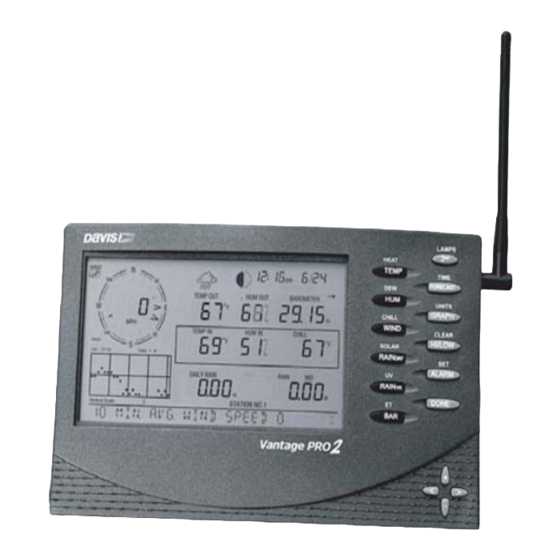
Vantage Pro2
Console Manual
™
™
For Vantage Pro2 & Vantage Pro2 Plus Weather Stations
Davis Instruments, 3465 Diablo Avenue, Hayward, CA 94545 • 510-732-9229 • www.davisnet.com
Related Manuals for DAVIS Vantage Pro2
Summary of Contents for DAVIS Vantage Pro2
-
Page 1
™ Vantage Pro2 Console Manual ™ ™ For Vantage Pro2 & Vantage Pro2 Plus Weather Stations Davis Instruments, 3465 Diablo Avenue, Hayward, CA 94545 • 510-732-9229 • www.davisnet.com… -
Page 2: Console Display Features
Connect the equipment into an outlet on a circuit different from that to which the receiver is connected. • Consult the dealer or an experienced radio/TV technician for help. Changes or modification not expressly approved in writing by Davis Instruments may void the warranty and void the user’s authority to operate this equipment. IC: 378810-6312 EC EMC Compliance This product complies with the essential protection requirements of the EC EMC Directive 89/336/EC.
-
Page 3: Table Of Contents
Highs and Lows Mode… 27 Alarm Mode… 29 Graph Mode … 31 Troubleshooting and Maintenance … 34 Vantage Pro2 Troubleshooting Guide … 34 Console Diagnostic Screens … 36 Console Maintenance… 40 One Year Limited Warranty … 40 Appendix A: Weather Data … 41 Appendix B: Specifications…
-
Page 4: Welcome To Vantage Pro2
WeatherLink software. Vantage Pro2 stations are available in two basic versions: Cabled and Wire- less. A Cabled Vantage Pro2 station transmits outside sensor data from the Integrated Sensor Suite (ISS) to the console using a straight-through four-con- ductor cable.
-
Page 5: Vantage Pro Options
Available for Cabled and Wireless stations. Requires Sensor (#6490) Mounting Shelf (#6672). Note: Optional wireless stations can only be used with Wireless Vantage Pro2 Stations. ® Optional WeatherLink The WeatherLink software and data logger connect your Vantage Pro2 station directly to a computer, providing enhanced weather monitoring capabilities and powerful internet features.
-
Page 6
ISS. Car/Boat/RV Lighter Cord (#6604) Allows the Vantage Pro2 console and ISS to draw power from a standard car cigarette lighter is the ISS is connected to the console using a cable. -
Page 7: Installing The Console
Wireless Vantage Pro2 Stations Wireless Vantage Pro2 consoles do not require the use of an AC adapter. You may use the included adapter if you wish, but the three C-cell batteries should power a wireless console for up to nine months.
-
Page 8: Installing Batteries
3. Replace the battery cover. Connecting Cabled Stations Cabled Vantage Pro2 stations come with 100 feet (30m) of cable. This cable is used for connecting the console to the ISS. Maximum cable length from ISS to the console using Davis Instruments cables is 1000 feet. To connect the con- sole to the ISS: 1.
-
Page 9: Console Location
If you have a wireless console, be aware of possible interference from cordless phones or other devices. To prevent interference, maintain a dis- tance of 10 feet between the Vantage Pro2 console and a cordless phone (handset and base). •…
-
Page 10
Console Location Table & Shelf Placement The console kickstand can be set to three different angles allowing five differ- ent display angles. 1. Install the two round rubber feet on the bottom of the console. The rubber feet help prevent damage to furniture and surfaces. 2. -
Page 11
8″ (203mm) apart for the #6 x 1″ mounting screws. This is a representation for the mounting hole positions. This template is not true to size. If installing a standard Vantage Pro2 console with sensor cable running inside the wall, mount the console over an empty switch box. -
Page 12: Using Your Weather Station
Console Modes The Vantage Pro2 console operates in five different modes: Mode Use Setup Mode to enter the time, date, and other information required to Setup calculate and display weather data.
-
Page 13
Screen 1: Active Transmitters Screen 1 displays the message “Receiving from…” and shows the transmitters being received by the console. In addition, an “X” blinks in the lower right- hand corner of the screen every time the console receives a data packet from a station. -
Page 14
Note: Typically, you can use the default transmitter ID setting of 1 unless you are installing one of the optional transmitter stations or a nearby neighbor has a Vantage Pro2 Station that uses transmit- ter ID 1 for the ISS. -
Page 15
Screen 4: Time & Date The very first time you power-up the console, the time and date are set to 12:00AM January 1 , 2004. Be sure to enter the correct date and local time. Screen 4: Time & Date To change the time and date: 1. -
Page 16
Royal Observatory in Greenwich, England. Hayward, California, the home of Davis Instruments, observes Pacific Standard Time. The UTC offset for Pacific Stan- dard Time is -8:00, or eight hours behind Universal Time (UTC). When it’s 7:00 pm (1900 hours) UTC, it’s 19 — 8 = 1100 hours, or 11:00 am in Hayward in winter. -
Page 17
1. Press the up and down arrows to cycle through time zones. 2. If your time zone is not shown, press 2ND then press the up and down arrows to set your UTC offset. 3. Press DONE to select the time zone or UTC offset shown on the screen and move to the next screen. -
Page 18
5. Press DONE to move to the next screen. Screen 11: Wind Cup Size Vantage Pro2 Stations come standard with large wind cups. Switch this setting to small only if you have separately purchased and installed small wind cups. Note: Large wind cups are more sensitive to low wind speeds and are the best choice for most users. -
Page 19
Screen 12: Rain Collector The tipping bucket in the Vantage Pro2 rain collector has been calibrated at the factory to measure 0.01» of rain with each tip. The ISS comes equipped with a metric adapter that, once installed, takes 0.2 mm readings for every tip of the bucket. -
Page 20
The baud rate setting on your console must match the serial port setting in the software on your computer. If you are using WeatherLink for Vantage Pro2, refer to WeatherLink help for instruc- tions on setting the serial port baud rate on your computer. -
Page 21: Current Weather Mode
The Clear All command clears all stored high and low weather data including monthly and yearly highs and lows and clears the alarm settings. The com- mand is recommended to properly clear and initialize the console’s data log- ging function. 1.
-
Page 22: Selecting Units Of Measure
Selecting Units of Measure WIND Selecting Units of Measure Most weather variables may be displayed in at least two different measure- ment units, including US and Metric systems, although some variables feature more possibilities. Barometric pressure, for example, may be displayed in mil- libars, millimeters, inches, or hectoPascals.
-
Page 23
3. Press WIND a second time to display the wind direction in degrees instead of the wind speed. Note: When displayed in degrees, Due North displays as 360 2005 or later. Previous releases marked Due North at 0 Each additional WIND key press toggles the display between wind speed and wind direction in degrees. -
Page 24
Selecting Units of Measure Wind Chill Press 2ND then press CHILL to select Wind Chill. Wind Chill is displayed in either Fahrenheit (ºF) or Celsius (ºC) in whole degrees. The console uses the ten-minute average wind speed to calculate wind chill. Dew Point Press 2ND then press DEW to select Dew Point. -
Page 25
Heat Index Press 2ND then press HEAT to display the Heat Index. THSW Index After you have selected the Heat Index, press 2ND then press HEAT again to select the Temperature Humidity Sun Wind (THSW) Index. The THSW Index is only available on stations equipped with a solar radiation sensor. The Heat Index and the THSW Index display in the same place on the screen and are displayed in degrees Fahrenheit (ºF) or Celsius (ºC). -
Page 26
Selecting Units of Measure Rain Storm Rain Storm displays the rain total of the last rain event. It takes two tips of the rain bucket to begin a storm event and 24 hours without rain to end a storm event. Press RAINDAY to toggle between the daily rain total and the Rain Storm total. -
Page 27: Displaying The Forecast
Note: When the console receives power from the AC adapter, the backlight remains on until it is toggled off. Leaving the backlight on raises the inside temperature reading and lowers the inside humidity reading. Displaying the Forecast Your console generates a weather forecast based on the barometric reading & trend, wind speed &…
-
Page 28
You can calibrate inside & outside temperature, inside & outside humidity, as well as any extra temperature/humidity sensor readings you have transmitting to your Vantage Pro2. 1. Select a variable to be calibrated. See “Selecting Weather Variables” on page 18. -
Page 29
8. Repeat steps 4 and 5 until you have entered the offset value from Step 1. 9. Press DONE to exit calibration. Calibrating Barometric Pressure Before calibrating the barometric pressure, be sure the station is set to the cor- rect elevation. 1. -
Page 30: Highs And Lows Mode
Highs and Lows Mode The Vantage Pro2 records highs and lows for many weather conditions over three different periods: days, months, and years. Except for Yearly Rainfall, all high and low registers are cleared automatically at the end of each period.
-
Page 31
The following table lists the high and low modes for all the weather variables: Weather Variable High Time & Outside Temperature Inside Temperature Outside Humidity Inside Humidity Barometer Heat Index Temp/Hum/Wind/Sun (THSW) Index Wind Chill Wind Speed Rainfall Rate Daily Rain Total UV Index Solar Radiation… -
Page 32: Alarm Mode
Current Weather mode. Alarm Mode The Vantage Pro2 features more than 30 alarms that can be programmed to sound whenever a reading exceeds a set value. With the exception of barometric pressure and time, all alarms sound when a reading reaches the alarm threshold.
-
Page 33
UV Dose The UV dose alarm sounds when the accumulated UV dose has exceeded the dose you set. The UV dose alarm does not arm unless the initial UV dose for the day has been reset. Once the UV dose alarm value is set, clear the accumu- lated UV dose. -
Page 34: Graph Mode
Wind Speed Time & Date Graph Mode The Vantage Pro2 console includes a powerful Graph Mode that allows you to view over 100 graphs of different kinds right on the screen, all without con- necting to a personal computer. Vantage Pro Station Alarms…
-
Page 35
Viewing Graphs Although the graphs available may vary for each weather variable, you display the graphs in the same way. 1. Press GRAPH to enter Graph Mode. Only the date, graph, graph icon, and selected variable are visible. The rest of the screen is blank. -
Page 36
Graph Mode View graphs of all other variables the same way. 1. Select the variable you want to view. 2. Press GRAPH. 3. Use the left and right arrows to select different variables. 4. Press the up arrow to shorten the time range. 5. -
Page 37: Troubleshooting And Maintenance
Troubleshooting and Maintenance Vantage Pro2 Troubleshooting Guide While your Vantage Pro2 weather station is designed to provide years of trou- ble-free operation, occasional problems may arise. If you are having a prob- lem with your station, please consult this troubleshooting guide before calling Davis technical support.
-
Page 38
Troubleshooting Reception Problems While we have tested the Wireless Vantage Pro2 radio extensively, each site and each installation presents its own issues and challenges. Obstructions, par- ticularly metallic ones, will often cut down your station’s reception distance. -
Page 39: Console Diagnostic Screens
The console’s reception status displays at the lower right corner of the screen. • An “X” flashes for every data packet received by the console. • An “R” is shown when the console is trying to re-establish a lost connec- tion.
-
Page 40
Console Diagnostic Screens • A degree ( ) sign displays in field 1 of the Reception Diagnostic screen to ° differentiate which screen is currently being displayed. Statistical Diagnostic Screen The Statistical Diagnostic displays information about how data is being received from the weather station to the console. -
Page 41
11. Current streak of consecutive packets received. 12. Graph of the percentage of scheduled ISS data packets received over the last 24 days. 13. Background noise level. The background noise level refers to the undesirable signal level the con- sole hears while it is in the process of acquiring a signal from a station. The range displayed is from 5 to 60. -
Page 42
In some cases, the problem may be that your console firmware doesn’t support what you are trying to do. Use this command to determine the firmware revi- sion level in your console. You can find more information on Vantage Pro2 console firmware versions and changes in the Weather Software Support sec- tion of our website. -
Page 43: Console Maintenance
Console Maintenance Changing Batteries Use this procedure to change console batteries without losing any stored weather data or console configuration settings. 1. Plug in the AC adapter or, if the AC adapter is not present, enter Setup Mode by pressing DONE and then the down arrow. Entering Setup Mode makes sure the station isn’t writing any data to mem- ory when power is removed.
-
Page 44: Appendix A Weather Data
Appendix A Weather Data Refer to this appendix to learn more about the weather variables that are mea- sured, displayed, and logged by your Vantage Pro2 Station. Some weather variables require optional sensors. See “Optional Sensors” starting on page 2. Wind The anemometer measures wind speed and direction, and is part of the Inte- grated Sensor Suite (ISS).
-
Page 45
Note: Vantage Pro2 calculates Heat Index only when the air temperature is above 57° F (14° C), because it’s insignificant at lower temperatures. Below 57°, 0° F (18° C) for consoles with firmware dated May 2005 or later, the Heat Index is equal to the air temperature. -
Page 46
Rain Vantage Pro2 incorporates a tipping-bucket rain collector in the ISS that mea- sures 0.01» for each tip of the bucket. A metric adapter can be installed to mea- sure 0.2 mm for each tip of the bucket.Your station logs rain data in the same units it is measured in and converts the logged totals into the selected display units (inches or millimeters) at the time it is displayed. -
Page 47
UV exposure. The readings do not suggest that any amount of exposure is safe or healthful. Do not use the Vantage Pro2 to determine the amount of UV radiation to which you expose yourself. Scientific evi- dence suggests that UV exposure should be avoided and that even low UV doses can be harmful. -
Page 48
Type II (Environment Canada) skin type might choose 0.75 MED as the maximum for the day; in contrast, a person with Type V (Environment Canada) Skin Type might consider 2.5 MEDs a reason- able dose for the day. NOTE: the Vantage Pro2 assumes a Fitzpatrick (Environment Canada) Skin Type of II. -
Page 49
Soil Moisture requires an optional Leaf & Soil Moisture/Temperature Station or Soil Moisture Station and is only available for Wireless Vantage Pro2 Stations. Time A built-in clock and calendar track the time and date. The console automati- cally adjusts for daylight savings time in North America, Europe and Australia (and allows manual adjustment elsewhere) and for leap years. -
Page 50: Appendix B Specifications
Appendix B Specifications See complete specifications for your Vantage Pro2 Station at our website: www.davisnet.com. Console Specifications Console Operating Temperature ..+14° to +140°F (-10° to +60°C) Display Temperature ….+32° to +140°F (0° to +60°C) Non-operating Temperature .
-
Page 51: Console Data Display Specifications
Console Data Display Specifications Historical Data ….. Includes the past 24 values listed un- Daily Data……Includes the earliest time of occur- Monthly Data .
-
Page 52: Weather Data Specifications
Weather Data Specifications Weather Data Specifications Note: These specifications include optional sensors that may not be installed in your Vantage Pro2 Station. Weather Data Specifications Variable Required Sensors Barometric Pressure Included in Console Barometric Trend (3 hour) ISS or Temp/Hum Evapotranspiration Station &…
-
Page 53
Weather Data Specifications Variable Required Sensors Solar Radiation Solar sensor Inside Included in Console Temperature ISS, Temp Station Outside or Temp Hum Temperature Station ISS, Temp Station, Temp Hum Station, Extra Temperature Leaf Soil Station or Soil Station ISS or Temp/Hum Heat Index Station Temp-Hum-Sun-… -
Page 54: Appendix C: Wireless Repeater Configuration
Not all consoles have the capability for repeater support. If your console has firmware dated earlier than May 2005, it does not have the capability to receive Vantage Pro2 wireless repeaters. To check your console’s firmware, press the DONE and up arrow (+) keys. The firmware revision date displays in the ticker tape section of the console.
-
Page 55
In the example below, the console is set up to receive an ISS station on transmitter ID 1 from repeater A. 6. For each station using a repeater, select the station and turn on the repeater function and select the correct repeater ID. 7. -
Page 56: Vantage Pro2 Console Icons
Contacting Davis Technical Support If you have any questions, or encounter problems installing or operating your Van- tage Pro 2 weather station, please contact Davis Technical Support. We’ll be glad to help. (510) 732-7814 — Monday — Friday, 7:00 a.m. — 5:30 p.m. Pacific Time. We are unable to accept collect calls.
-
Page 1
™ Vantage Pro2 Console Manual ™ ™ For Vantage Pro2 & Vantage Pro2 Plus Weather Stations Davis Instruments, 3465 Diablo Avenue, Hayward, CA 94545 • 510-732-9229 • www.davisnet.com… -
Page 2: Console Display Features
Connect the equipment into an outlet on a circuit different from that to which the receiver is connected. • Consult the dealer or an experienced radio/TV technician for help. Changes or modification not expressly approved in writing by Davis Instruments may void the warranty and void the user’s authority to operate this equipment. IC: 378810-6312 EC EMC Compliance This product complies with the essential protection requirements of the EC EMC Directive 89/336/EC.
-
Page 3: Table Of Contents
Highs and Lows Mode… 27 Alarm Mode… 29 Graph Mode … 31 Troubleshooting and Maintenance … 34 Vantage Pro2 Troubleshooting Guide … 34 Console Diagnostic Screens … 36 Console Maintenance… 40 One Year Limited Warranty … 40 Appendix A: Weather Data … 41 Appendix B: Specifications…
-
Page 4: Welcome To Vantage Pro2
WeatherLink software. Vantage Pro2 stations are available in two basic versions: Cabled and Wire- less. A Cabled Vantage Pro2 station transmits outside sensor data from the Integrated Sensor Suite (ISS) to the console using a straight-through four-con- ductor cable.
-
Page 5: Vantage Pro Options
Available for Cabled and Wireless stations. Requires Sensor (#6490) Mounting Shelf (#6672). Note: Optional wireless stations can only be used with Wireless Vantage Pro2 Stations. ® Optional WeatherLink The WeatherLink software and data logger connect your Vantage Pro2 station directly to a computer, providing enhanced weather monitoring capabilities and powerful internet features.
-
Page 6
ISS. Car/Boat/RV Lighter Cord (#6604) Allows the Vantage Pro2 console and ISS to draw power from a standard car cigarette lighter is the ISS is connected to the console using a cable. -
Page 7: Installing The Console
Wireless Vantage Pro2 Stations Wireless Vantage Pro2 consoles do not require the use of an AC adapter. You may use the included adapter if you wish, but the three C-cell batteries should power a wireless console for up to nine months.
-
Page 8: Installing Batteries
3. Replace the battery cover. Connecting Cabled Stations Cabled Vantage Pro2 stations come with 100 feet (30m) of cable. This cable is used for connecting the console to the ISS. Maximum cable length from ISS to the console using Davis Instruments cables is 1000 feet. To connect the con- sole to the ISS: 1.
-
Page 9: Console Location
If you have a wireless console, be aware of possible interference from cordless phones or other devices. To prevent interference, maintain a dis- tance of 10 feet between the Vantage Pro2 console and a cordless phone (handset and base). •…
-
Page 10
Console Location Table & Shelf Placement The console kickstand can be set to three different angles allowing five differ- ent display angles. 1. Install the two round rubber feet on the bottom of the console. The rubber feet help prevent damage to furniture and surfaces. 2. -
Page 11
8″ (203mm) apart for the #6 x 1″ mounting screws. This is a representation for the mounting hole positions. This template is not true to size. If installing a standard Vantage Pro2 console with sensor cable running inside the wall, mount the console over an empty switch box. -
Page 12: Using Your Weather Station
Console Modes The Vantage Pro2 console operates in five different modes: Mode Use Setup Mode to enter the time, date, and other information required to Setup calculate and display weather data.
-
Page 13
Screen 1: Active Transmitters Screen 1 displays the message “Receiving from…” and shows the transmitters being received by the console. In addition, an “X” blinks in the lower right- hand corner of the screen every time the console receives a data packet from a station. -
Page 14
Note: Typically, you can use the default transmitter ID setting of 1 unless you are installing one of the optional transmitter stations or a nearby neighbor has a Vantage Pro2 Station that uses transmit- ter ID 1 for the ISS. -
Page 15
Screen 4: Time & Date The very first time you power-up the console, the time and date are set to 12:00AM January 1 , 2004. Be sure to enter the correct date and local time. Screen 4: Time & Date To change the time and date: 1. -
Page 16
Royal Observatory in Greenwich, England. Hayward, California, the home of Davis Instruments, observes Pacific Standard Time. The UTC offset for Pacific Stan- dard Time is -8:00, or eight hours behind Universal Time (UTC). When it’s 7:00 pm (1900 hours) UTC, it’s 19 — 8 = 1100 hours, or 11:00 am in Hayward in winter. -
Page 17
1. Press the up and down arrows to cycle through time zones. 2. If your time zone is not shown, press 2ND then press the up and down arrows to set your UTC offset. 3. Press DONE to select the time zone or UTC offset shown on the screen and move to the next screen. -
Page 18
5. Press DONE to move to the next screen. Screen 11: Wind Cup Size Vantage Pro2 Stations come standard with large wind cups. Switch this setting to small only if you have separately purchased and installed small wind cups. Note: Large wind cups are more sensitive to low wind speeds and are the best choice for most users. -
Page 19
Screen 12: Rain Collector The tipping bucket in the Vantage Pro2 rain collector has been calibrated at the factory to measure 0.01» of rain with each tip. The ISS comes equipped with a metric adapter that, once installed, takes 0.2 mm readings for every tip of the bucket. -
Page 20
The baud rate setting on your console must match the serial port setting in the software on your computer. If you are using WeatherLink for Vantage Pro2, refer to WeatherLink help for instruc- tions on setting the serial port baud rate on your computer. -
Page 21: Current Weather Mode
The Clear All command clears all stored high and low weather data including monthly and yearly highs and lows and clears the alarm settings. The com- mand is recommended to properly clear and initialize the console’s data log- ging function. 1.
-
Page 22: Selecting Units Of Measure
Selecting Units of Measure WIND Selecting Units of Measure Most weather variables may be displayed in at least two different measure- ment units, including US and Metric systems, although some variables feature more possibilities. Barometric pressure, for example, may be displayed in mil- libars, millimeters, inches, or hectoPascals.
-
Page 23
3. Press WIND a second time to display the wind direction in degrees instead of the wind speed. Note: When displayed in degrees, Due North displays as 360 2005 or later. Previous releases marked Due North at 0 Each additional WIND key press toggles the display between wind speed and wind direction in degrees. -
Page 24
Selecting Units of Measure Wind Chill Press 2ND then press CHILL to select Wind Chill. Wind Chill is displayed in either Fahrenheit (ºF) or Celsius (ºC) in whole degrees. The console uses the ten-minute average wind speed to calculate wind chill. Dew Point Press 2ND then press DEW to select Dew Point. -
Page 25
Heat Index Press 2ND then press HEAT to display the Heat Index. THSW Index After you have selected the Heat Index, press 2ND then press HEAT again to select the Temperature Humidity Sun Wind (THSW) Index. The THSW Index is only available on stations equipped with a solar radiation sensor. The Heat Index and the THSW Index display in the same place on the screen and are displayed in degrees Fahrenheit (ºF) or Celsius (ºC). -
Page 26
Selecting Units of Measure Rain Storm Rain Storm displays the rain total of the last rain event. It takes two tips of the rain bucket to begin a storm event and 24 hours without rain to end a storm event. Press RAINDAY to toggle between the daily rain total and the Rain Storm total. -
Page 27: Displaying The Forecast
Note: When the console receives power from the AC adapter, the backlight remains on until it is toggled off. Leaving the backlight on raises the inside temperature reading and lowers the inside humidity reading. Displaying the Forecast Your console generates a weather forecast based on the barometric reading & trend, wind speed &…
-
Page 28
You can calibrate inside & outside temperature, inside & outside humidity, as well as any extra temperature/humidity sensor readings you have transmitting to your Vantage Pro2. 1. Select a variable to be calibrated. See “Selecting Weather Variables” on page 18. -
Page 29
8. Repeat steps 4 and 5 until you have entered the offset value from Step 1. 9. Press DONE to exit calibration. Calibrating Barometric Pressure Before calibrating the barometric pressure, be sure the station is set to the cor- rect elevation. 1. -
Page 30: Highs And Lows Mode
Highs and Lows Mode The Vantage Pro2 records highs and lows for many weather conditions over three different periods: days, months, and years. Except for Yearly Rainfall, all high and low registers are cleared automatically at the end of each period.
-
Page 31
The following table lists the high and low modes for all the weather variables: Weather Variable High Time & Outside Temperature Inside Temperature Outside Humidity Inside Humidity Barometer Heat Index Temp/Hum/Wind/Sun (THSW) Index Wind Chill Wind Speed Rainfall Rate Daily Rain Total UV Index Solar Radiation… -
Page 32: Alarm Mode
Current Weather mode. Alarm Mode The Vantage Pro2 features more than 30 alarms that can be programmed to sound whenever a reading exceeds a set value. With the exception of barometric pressure and time, all alarms sound when a reading reaches the alarm threshold.
-
Page 33
UV Dose The UV dose alarm sounds when the accumulated UV dose has exceeded the dose you set. The UV dose alarm does not arm unless the initial UV dose for the day has been reset. Once the UV dose alarm value is set, clear the accumu- lated UV dose. -
Page 34: Graph Mode
Wind Speed Time & Date Graph Mode The Vantage Pro2 console includes a powerful Graph Mode that allows you to view over 100 graphs of different kinds right on the screen, all without con- necting to a personal computer. Vantage Pro Station Alarms…
-
Page 35
Viewing Graphs Although the graphs available may vary for each weather variable, you display the graphs in the same way. 1. Press GRAPH to enter Graph Mode. Only the date, graph, graph icon, and selected variable are visible. The rest of the screen is blank. -
Page 36
Graph Mode View graphs of all other variables the same way. 1. Select the variable you want to view. 2. Press GRAPH. 3. Use the left and right arrows to select different variables. 4. Press the up arrow to shorten the time range. 5. -
Page 37: Troubleshooting And Maintenance
Troubleshooting and Maintenance Vantage Pro2 Troubleshooting Guide While your Vantage Pro2 weather station is designed to provide years of trou- ble-free operation, occasional problems may arise. If you are having a prob- lem with your station, please consult this troubleshooting guide before calling Davis technical support.
-
Page 38
Troubleshooting Reception Problems While we have tested the Wireless Vantage Pro2 radio extensively, each site and each installation presents its own issues and challenges. Obstructions, par- ticularly metallic ones, will often cut down your station’s reception distance. -
Page 39: Console Diagnostic Screens
The console’s reception status displays at the lower right corner of the screen. • An “X” flashes for every data packet received by the console. • An “R” is shown when the console is trying to re-establish a lost connec- tion.
-
Page 40
Console Diagnostic Screens • A degree ( ) sign displays in field 1 of the Reception Diagnostic screen to ° differentiate which screen is currently being displayed. Statistical Diagnostic Screen The Statistical Diagnostic displays information about how data is being received from the weather station to the console. -
Page 41
11. Current streak of consecutive packets received. 12. Graph of the percentage of scheduled ISS data packets received over the last 24 days. 13. Background noise level. The background noise level refers to the undesirable signal level the con- sole hears while it is in the process of acquiring a signal from a station. The range displayed is from 5 to 60. -
Page 42
In some cases, the problem may be that your console firmware doesn’t support what you are trying to do. Use this command to determine the firmware revi- sion level in your console. You can find more information on Vantage Pro2 console firmware versions and changes in the Weather Software Support sec- tion of our website. -
Page 43: Console Maintenance
Console Maintenance Changing Batteries Use this procedure to change console batteries without losing any stored weather data or console configuration settings. 1. Plug in the AC adapter or, if the AC adapter is not present, enter Setup Mode by pressing DONE and then the down arrow. Entering Setup Mode makes sure the station isn’t writing any data to mem- ory when power is removed.
-
Page 44: Appendix A Weather Data
Appendix A Weather Data Refer to this appendix to learn more about the weather variables that are mea- sured, displayed, and logged by your Vantage Pro2 Station. Some weather variables require optional sensors. See “Optional Sensors” starting on page 2. Wind The anemometer measures wind speed and direction, and is part of the Inte- grated Sensor Suite (ISS).
-
Page 45
Note: Vantage Pro2 calculates Heat Index only when the air temperature is above 57° F (14° C), because it’s insignificant at lower temperatures. Below 57°, 0° F (18° C) for consoles with firmware dated May 2005 or later, the Heat Index is equal to the air temperature. -
Page 46
Rain Vantage Pro2 incorporates a tipping-bucket rain collector in the ISS that mea- sures 0.01» for each tip of the bucket. A metric adapter can be installed to mea- sure 0.2 mm for each tip of the bucket.Your station logs rain data in the same units it is measured in and converts the logged totals into the selected display units (inches or millimeters) at the time it is displayed. -
Page 47
UV exposure. The readings do not suggest that any amount of exposure is safe or healthful. Do not use the Vantage Pro2 to determine the amount of UV radiation to which you expose yourself. Scientific evi- dence suggests that UV exposure should be avoided and that even low UV doses can be harmful. -
Page 48
Type II (Environment Canada) skin type might choose 0.75 MED as the maximum for the day; in contrast, a person with Type V (Environment Canada) Skin Type might consider 2.5 MEDs a reason- able dose for the day. NOTE: the Vantage Pro2 assumes a Fitzpatrick (Environment Canada) Skin Type of II. -
Page 49
Soil Moisture requires an optional Leaf & Soil Moisture/Temperature Station or Soil Moisture Station and is only available for Wireless Vantage Pro2 Stations. Time A built-in clock and calendar track the time and date. The console automati- cally adjusts for daylight savings time in North America, Europe and Australia (and allows manual adjustment elsewhere) and for leap years. -
Page 50: Appendix B Specifications
Appendix B Specifications See complete specifications for your Vantage Pro2 Station at our website: www.davisnet.com. Console Specifications Console Operating Temperature ..+14° to +140°F (-10° to +60°C) Display Temperature ….+32° to +140°F (0° to +60°C) Non-operating Temperature .
-
Page 51: Console Data Display Specifications
Console Data Display Specifications Historical Data ….. Includes the past 24 values listed un- Daily Data……Includes the earliest time of occur- Monthly Data .
-
Page 52: Weather Data Specifications
Weather Data Specifications Weather Data Specifications Note: These specifications include optional sensors that may not be installed in your Vantage Pro2 Station. Weather Data Specifications Variable Required Sensors Barometric Pressure Included in Console Barometric Trend (3 hour) ISS or Temp/Hum Evapotranspiration Station &…
-
Page 53
Weather Data Specifications Variable Required Sensors Solar Radiation Solar sensor Inside Included in Console Temperature ISS, Temp Station Outside or Temp Hum Temperature Station ISS, Temp Station, Temp Hum Station, Extra Temperature Leaf Soil Station or Soil Station ISS or Temp/Hum Heat Index Station Temp-Hum-Sun-… -
Page 54: Appendix C: Wireless Repeater Configuration
Not all consoles have the capability for repeater support. If your console has firmware dated earlier than May 2005, it does not have the capability to receive Vantage Pro2 wireless repeaters. To check your console’s firmware, press the DONE and up arrow (+) keys. The firmware revision date displays in the ticker tape section of the console.
-
Page 55
In the example below, the console is set up to receive an ISS station on transmitter ID 1 from repeater A. 6. For each station using a repeater, select the station and turn on the repeater function and select the correct repeater ID. 7. -
Page 56: Vantage Pro2 Console Icons
Contacting Davis Technical Support If you have any questions, or encounter problems installing or operating your Van- tage Pro 2 weather station, please contact Davis Technical Support. We’ll be glad to help. (510) 732-7814 — Monday — Friday, 7:00 a.m. — 5:30 p.m. Pacific Time. We are unable to accept collect calls.

 ПРОДУКТ ВЫШЕVIEW
фургонtage Pro2™
Руководство пользователя
фургонtage Метеостанция Pro2
Идеально для:
- Метеорологи
- Фермеры
- Любители погоды
- Специалисты по чрезвычайным ситуациям
- Воспитатели
- Исследователи
- Муниципалитеты

Надежное и точное измерение основных параметров погоды
ВанtagМетеостанция Pro2 предоставляет технологии и данные в режиме реального времени, необходимые для реагирования на изменяющиеся условия и принятия своевременных решений.
Разработанный для работы в суровых условиях и год за годом предоставляющий данные с научной точностью, экономичный фургонtage Pro2 предлагает профессиональным наблюдателям за погодой или серьезным энтузиастам погоды надежную работу с широким спектром опций и датчиков.
| Температура | Индекс охлаждения ветром и головы | Влажность и точка росы |
 |
||
| Барометрическое давление | Осадки и интенсивность дождя | Скорость и направление ветра |
 |
ОСНОВНЫЕ ХАРАКТЕРИСТИКИ
 |
Наблюдайте за погодой так, как она происходит, с обновлениями почти в реальном времени быстро меняющихся данных о ветре, температуре и дожде. |
| Радиосвязь с расширенным спектром и скачкообразной перестройкой частоты обеспечивает передачу на расстояние до 1,000 футов/300 м и превосходный прием. | |
| Прочная конструкция проходит не менее 10 тестов перед отправкой, включая тщательную калибровку и проверку прочности материала. | |
| Гибкие возможности связи для легкой отправки данных на консоль через беспроводной передатчик на солнечной энергии или кабельную станцию. | |
| Легко включайте дополнительные датчики Davis для создания пользовательской сети датчиков, адаптированной к вашим конкретным потребностям. |
Умный способ view и транслируйте данные о погоде в реальном времени
Консоль WeatherLink революционизирует способ доступа, анализа и понимания ваших гиперлокальных данных о погоде, сообщаемых вашим фургоном.tage Pro2 или ВанtagНабор датчиков Vue® или ваша собственная сеть из нескольких датчиков Davis. Одно интуитивно понятное устройство позволяет получать и отображать данные из локальной сети и подключаться к Wi-Fi, чтобы отправлять данные в облако WeatherLink.

| 80+ | 10+ | сенсорный экран |
| Подключенные датчики к одному WeatherLink Live | Различные типы датчиков | Интерактивный HD-дисплей |
| 1,000FT | Живые данные | Локальная сеть или использование Wi-Fi |
| Расстояние передачи | Обновление данных в реальном времени | Используйте Wi-Fi, чтобы присоединиться к сообществу WeatherLink |
Следите за своей средой

Настройте пользовательскую сеть из более чем 80 датчиков на 8 передатчиках, чтобы вы могли просматривать данные с датчиков в саду, у бассейна, в гараже и в винном погребе — и все это с помощью одной консоли WeatherLink.

Данные viewс WeatherLink® Cloud
Получите доступ к своим данным на Weatherlink.com и App с любого подключенного устройства через WeatherLink Cloud. Используйте API WeatherLink, чтобы легко интегрировать данные о погоде и датчиках в свои собственные инновационные приложения.

? ПОПРОБУЙТЕ МОБИЛЬНОЕ ПРИЛОЖЕНИЕ
С помощью приложения Davis Mobilize вы можете быстро просматривать данные датчиков, создавать настраиваемые отчеты, устанавливать и получать оповещения, а также обмениваться информацией с другими.
ПРОДУКТ ВЫШЕVIEW
Консоль WeatherLink®

Инновации:
- Яркий интерактивный HD-дисплей
- Настраиваемая панель управления
- Персонализированные данные в режиме реального времени viewИНГ
- Создавайте графики и устанавливайте будильники
- Загрузить данные в облако WeatherLink

Умный способ view и транслируйте данные о погоде в реальном времени
Консоль WeatherLink революционизирует способ доступа, анализа и понимания ваших гиперлокальных данных о погоде, сообщаемых вашим фургоном.tage Pro2™ или фургонtagНабор датчиков Vue® или ваша собственная сеть из нескольких датчиков Davis.
Одно интуитивно понятное устройство позволяет получать и отображать данные из локальной сети и подключаться к Wi-Fi для передачи данных в облако WeatherLink.
| Температура | Индекс охлаждения ветром и головы | Влажность и точка росы |
|
||
| Барометрическое давление | Осадки и интенсивность дождя | Скорость и направление ветра |
|
И БОЛЬШЕ…
ОСНОВНЫЕ ХАРАКТЕРИСТИКИ
 |
Используйте яркий сенсорный экран высокой четкости для удобной навигации, viewи анализируйте данные о погоде на одном интуитивно понятном устройстве. |
 |
Настройте приборную панель, чтобы отображать до 21 параметра — от температуры до ветра и дождя — и просматривать информацию, которая важна для вас. |
 |
Используйте полную базу данных исторических записей, хранящихся прямо на консоли, для создания пользовательских графиков и анализа данных. |
 |
Выберите один из сотен параметров и дюжину звуков, чтобы получать уведомления об изменениях в окружающей среде, которые вас больше всего волнуют. |
 |
Консоль WeatherLink — это полнофункциональное и мощное средство отображения, хранения и анализа данных, не требующее подключения к сети Wi-Fi. Или вы можете подключиться к Wi-Fi, чтобы присоединиться к сообществу WeatherLink и безопасно и безопасно загружать и обмениваться данными. |
Самая мощная погодная консоль на рынке

Консоль WeatherLink работает как с фургоном,tage Вью и фургонtagе Про2. Смешивайте и подбирайте до 8 метеостанций или датчиков Davis.
Предоставляет вам возможность подключать более 80 датчиков в тысячах комбинаций к одной консоли WeatherLink.
Получите все эти данные с самой высокой скоростью на рынке.
| 80+ | 10+ | сенсорный экран |
| Подключенные датчики к одному WeatherLink Live | Различные типы датчиков | Интерактивный HD-дисплей |
| 1,000FT | Живые данные | Локальная сеть или Wi-Fi |
| Расстояние передачи | Обновление данных в реальном времени | Используйте Wi-Fi, чтобы присоединиться к сообществу WeatherLink |
Следите за своей средой

Настройте пользовательскую сеть из более чем 80 датчиков на 8 передатчиках, чтобы вы могли просматривать данные с датчиков в саду, у бассейна, в гараже и в винном погребе — и все это с помощью одной консоли WeatherLink.

Данные viewс WeatherLink Cloud
Получите доступ к своим данным на Weatherlink.com и App с любого подключенного устройства через WeatherLink Cloud. Используйте API WeatherLink, чтобы легко интегрировать данные о погоде и датчиках в свои собственные инновационные приложения.

? ПОПРОБУЙТЕ МОБИЛЬНОЕ ПРИЛОЖЕНИЕ
С помощью приложения Davis Mobilize вы можете быстро просматривать данные датчиков, создавать настраиваемые отчеты, устанавливать и получать оповещения, а также обмениваться информацией с другими.
© 2022 АЭМ. Все права защищены. ДЕКАБРЬ2022-V1
davisinstruments.com
sales@davisinstruments.com
Документы / Ресурсы
Рекомендации
Содержание
- Руководство по эксплуатации DAVIS Vantage Pro2
- Руководство по эксплуатации для устройства DAVIS Vantage Pro2
- Как пользоваться?
- Метеостанции Vantage Pro 2 Davis Instruments
- Метеостанция Vantage Pro 2 6152 Davis Insruments (США) — беспроводная метеостанция для профессионального мониторинга погодных условий
- Сбор погодных данных метеостанцией Vantage Pro 2 6152 Davis
- Погодные данные которые измеряются датчиками климатического блока метеостанции Davis 6152 Vantage Pro 2
- Отображение и хранение данных о погоде метеостанцией Vantage Pro 2 6152 Davis
- Основные функциональные возможности метеостанции Vantage Pro 2 6152 Davis
- Метеостанция Vantage Pro 2 6153 Davis Insruments (США) — беспроводная метеостанция с системой дополнительного 24-го охлаждения для профессионального мониторинга погодных условий
- Функции кнопок управления и жесты
- Режим отображения времени и меню
- Предтренировочный режим
- В процессе тренировки
- Цветной сенсорный дисплей
- Просмотр уведомлений и доступ к управлению музыкой
- Функция нажатия
- Жест активации подсветки
Руководство по эксплуатации DAVIS Vantage Pro2
Руководство по эксплуатации для устройства DAVIS Vantage Pro2
Устройство: DAVIS Vantage Pro2
Размер: 0,61 MB
Добавлено: 2013-04-01 20:17:52
Количество страниц: 32
Печатать инструкцию
Как пользоваться?
Наша цель — обеспечить Вам самый быстрый доступ к руководству по эксплуатации устройства DAVIS Vantage Pro2 . Пользуясь просмотром онлайн Вы можете быстро просмотреть содержание и перейти на страницу, на которой найдете решение своей проблемы с DAVIS Vantage Pro2 .
Для Вашего удобства
Если просмотр руководства DAVIS Vantage Pro2 непосредственно на этой странице для Вас неудобен, Вы можете воспользоваться двумя возможными решениями:
- Полноэкранный просмотр -, Чтобы удобно просматривать инструкцию (без скачивания на компьютер) Вы можете использовать режим полноэкранного просмотра. Чтобы запустить просмотр инструкции DAVIS Vantage Pro2 на полном экране, используйте кнопку Полный экран .
- Скачивание на компьютер — Вы можете также скачать инструкцию DAVIS Vantage Pro2 на свой компьютер и сохранить ее в своем архиве. Если ты все же не хотите занимать место на своем устройстве, Вы всегда можете скачать ее из ManualsBase.
Печатная версия
Многие предпочитают читать документы не на экране, а в печатной версии. Опция распечатки инструкции также предусмотрена и Вы можете воспользоваться ею нажав на ссылку, находящуюся выше — Печатать инструкцию . Вам не обязательно печатать всю инструкцию DAVIS Vantage Pro2 а только некоторые страницы. Берегите бумагу.
Резюме
Ниже Вы найдете заявки которые находятся на очередных страницах инструкции для DAVIS Vantage Pro2 . Если Вы хотите быстро просмотреть содержимое страниц, которые находятся на очередных страницах инструкции, Вы воспользоваться ими.
Источник
Метеостанции Vantage Pro 2 Davis Instruments

Метеостанция Vantage Pro 2 6152 Davis Insruments (США) — беспроводная метеостанция для профессионального мониторинга погодных условий
Метеостанция Vantage Pro 2 6152 — беспроводной метеокомплекс
- дальность передачи данных на 300м.,
- питание от солнечной батареи,
- обновление данных каждые 2,5 секунд,
- совместима с программным обеспечением WeatherLink для передачи данных на ПК или веб-сайт.
Сбор погодных данных метеостанцией Vantage Pro 2 6152 Davis
Метеостанция Davis 6152 Vantage Pro 2 считывает метеоданные датчиками климатического блока. Климатический блок метеостанции состоит из погодоустойчивого материала, что обеспечивает надежность и долговечность применения.
Погодные данные которые измеряются датчиками климатического блока метеостанции Davis 6152 Vantage Pro 2
- прогноз погоды до 48 часов;
- атмосферное давление;
- скорость и направления ветра;
- температура и влажность воздуха;
- количество и интенсивность осадков;
Количество измеряемых погодных данных метеостанцией можно увеличить добавляя к комплектации метеостанции Vantage Pro 2 6152 дополнительные датчики: солнечного и ультрафиолетового излучения, влажности листвы, влажности почвы, температуру почвы и т.д..
Отображение и хранение данных о погоде метеостанцией Vantage Pro 2 6152 Davis
Метеостанция Davis 6152 Vantage Pro 2 отображает данные на цыфровой консоли метеостанции. Консоль метеостанции записывает и отображает данные о погоде с климатического блока, температуру и влажность воздуха в помещении, атмосферное давление (датчики встроенные в консоли метеостанции); рисует графики и сигнализизует, если один из погодных параметров вышел за допустимые границы.
Консоль метеостанции может принимать данные от 8 метеоустройст Davis instruments (другой консоли, почвенного блока, блока измерения температуры, блока измерения температуры и влажности воздуха, модулей приема и передачи данных WeatherEnvoy и Envoy8X, Vantage Connect).
Консоль метеостанции подключается к компьютеру с помощью ПО WeatherLink через USB или SER соединение для передачи, сохранения, обработки и анализа данных. При помощи ПО WeatherLink с интернет протоколом IP можно передавать данные на вебсайт и просматривать на вашей странице в интернете с любого ПК или сматрфона.
Основные функциональные возможности метеостанции Vantage Pro 2 6152 Davis
Измерение текущего атмосферного давления датчиком, встроенным в корпус консоли метеостанции Davis 6152 Vantage Pro2 и отображение тенденции его изменения за последние три часа: в виде одной из 5-ти стрелок (растет быстро, растет медленно, не меняется, падает медленно или падает быстро); быстрое изменение давления означает рост или падение на 1,5 или более мм.рт.ст., медленное: на 0,5 мм.рт.ст.
Символьный прогноз погоды (на предстоящие 12 часов: ясно, переменная облачность, облачно, дождь или снег) с усовершенствованным алгоритмом на основании показаний и тенденции атмосферного давления, скорости и направления ветра, уровня осадков, температуры, влажности, географической широты и долготы, времени года; обновление прогноза: один раз в час; возможно отображение прогноза погоды на ближайшие 48 часов в виде бегущей строки.
Измерение температуры воздуха в помещении диапазон измерения: 0..+60°С, разрешение: 0,1°С, точность: +/-0,5°С, интервал: 60 сек, возможно отображение температуры в градусах Фаренгейта (°F).
Измерение относительной влажности воздуха в помещении диапазон измерения: 10..90% RH, разрешение: 1% RH, точность: +/-5% RH, интервал: 60 сек.
Текущее время (в 12-ти или 24-х часовом формате), календарь, время восхода и заката солнца, фаза луны; автоматический переход на летнее время; будильник.
Частота приема/передачи метеостанции Davis 6152 Vantage Pro2: 868,35 МГц, сертифицированная в ЕС малая мощность: менее 8 mW; дальность связи в прямой видимости: до 300 м., при наличии преград расстояние сокращается в разы (наличие стен сокращает расстояние обычно до 60-120 м.).
Измерение температуры и относительной влажности воздуха снаружи диапазон измерения температуры: -40..+65°С, разрешение: 0,1°С, точность: +/-0,5°С,интервал: 10-12 сек,
диапазон измерения относительной влажности: 0..100% RH, разрешение: 1% RH,точность: +/-3% RH, интервал: 50-60 сек
Определение температуры точки росы диапазон измерения: -76..+54°С, разрешение: 1°С, точность: +/-1,5°С, интервал: 10 сек
Определение индекса нагревания диапазон измерения: +14..+52°С, разрешение: 1°С, точность: +/-1,5°С
Измерение скорости и направления ветра единицы измерения: м/с (m/s), км/ч (km/h), мили/ч (mph) или узлах (knots), индикация скорости ветра за последние 10 сек,диапазон измерения скорости ветра: 1..68 м/с (3. 241 км/ч), разрешение: 0,5 м/с (1 км/ч), точность: +/-5% или 1 м/с (3 км/ч), интервал: 2,5-3 сек,
Измерение температуры охлаждения ветром диапазон измерения: -84..+54°С, разрешение: 1°С, точность: +/-1°С, интервал: 10 сек,
Измерение количества осадков выпавших за день или за определенный период единицы измерения: дюймы или мм, измерение количества осадков выпавших за время дождя (с первых двух капель до отсутствия дождя в течение 24-х часов) и за сутки: до 999,9 мм, за месяц (календарный) и за год (с 1-ого числа выбранного месяца): до 19999 мм, разрешение: 0,25 мм (1 мм при суммарном значении более 2000 мм), точность: +/-4%, измерение текущей интенсивности выпадения осадков в диапазоне: 0..1999,9 мм/ч, разрешение: 0,25 мм (0,01 дюйма), точность: +/-5% или 1 мм/ч, интервал: 10-12 сек. • Отображение иконки «зонтика», означающей, что в данный момент идет дождь, появляется при выпадении более 0,508 мм (
две капли) осадков за 15 минут,
Измерение интенсивности солнечного излучения, индекса THSW и суммарного испарения возможно только после приобретения датчика солнечной радиации Davis 6450.
Измерение индекса и дозы ультрафиолетового излучения возможно только после приобретения датчика УФ излучения Davis 6490.
Измерение влажности листвы, температуры и влажности почвы возможно только после приобретения станции Davis 6345.
Функция калибровки (настройки точности) внутренней и внешней температуры, внутренней и внешней относительной влажности, направления ветра и атмосферного давления.
Метеостанция Davis 6152 Vantage Pro2 оптимизирована для работы с минимальным потреблением энергии и не требует обязательного использования блока питания;
3 щелочные батареи типа «С» обеспечивают работу консоли примерно в течение 12 месяцев; питание блока метеодатчиков и анемометра осуществляется с помощью солнечной и литиевой батарей. Консоль беспроводной метеостанции Davis 6152 Vantage Pro2 имеет возможность принимать метеоданные максимум от 8 передатчиков атмосферного давления.
Возможность подключения к ПК метеостанции Davis 6152 Vantage Pro2 при использовании интерфейса и программного обеспечения
Комплект поставки метеостанции Davis 6152 Vantage Pro2
- Консоль (6312),
- Анемометр с кабелем (12 м),
- Блок метеодатчиков (6322),
- Блок питания на 220В (под стандартную украинскую розетку),
- Крепления для монтажа,
- Инструкция,
- Годовая гарантия официального представителя компании DEVIS в Украине
Дополнительное оборудование, которое не входит в комплект поставки метеостанции Davis 6152 Vantage Pro2 и при желании приобретается отдельно:
- Возможность консоли дополнительно просматривать данные с более чем одного места,
- Беспроводные станции измерения влажность и температура для почвы и листьев,
- Беспроводная станция температуры,
- Беспроводные станции температуры и влажности,
- Анемометр/ретранслятор датчика
Габаритные размеры метеостанции Davis 6152 Vantage Pro2
- Консоль управления: 240х150х38 мм,
- ЖК-дисплей: 150х90 мм,
- Блок метеодатчиков: 280х356х238 мм,
- Анемометр с креплением: 370х130х445 мм.
Метеостанция Vantage Pro 2 6153 Davis Insruments (США) — беспроводная метеостанция с системой дополнительного 24-го охлаждения для профессионального мониторинга погодных условий
 Метеостанция Davis 6153 Vantage Pro2 — улучшенная версия метеостанции Vantage Pro 2 6152 Davis Insruments (США), отличие:
- в комплект блока метеодатчиков метеостанции входит 24-часовой вентилятор с дополнительными пластинами для защиты от солнечного излучения (нагревания);
- активная защита уменьшает воздействие солнечного излучения на климатический блок метеостанции, что приводит к снижению нагревание датчиков и, соответственно, повышает точность измерения температуры и влажности;
- вентилятор климатического блока метеостанции работает 24 часа в день, 7 дней в неделю питаясь от солнечной (днем) и аккумуляторной (ночью) батарей;
- поток обдува составляет 2.5 мс днем и 1.4 мс ночью;
- если уровень освещенности (в зимнее время, в периоды тяжелого облачного покрова и т.п.) недостаточен для работы вентилятора, то вентилятор останавливается, израсходовав заряд аккумулятора;
- поскольку уровень освещенности понижается, то потребность в активной защите от солнечной радиации также уменьшается.
Комплект поставки метеостанции Davis 6153 Vantage Pro2
- Блок управления метеокомплексом (консоль);
- Анемометр с кабелем (12 м.),
- Блок метеодатчиков,
- Блок питания на 220В (под стандартную украинскую розетку),
- Крепления для монтажа,
- Инструкция;
- Годовая гарантия официального представителя компании DEVIS в Украине
Габаритные размеры метеостанции Davis 6153 Vantage Pro2
- Консоль управления: 240х150х38 мм,
- ЖК-дисплей: 150х90 мм,
- Блок метеодатчиков: 280х356х238 мм,
- Анемометр с креплением: 370х130х445 мм.
Источник
Функции кнопок управления и жесты
На ваших часах есть пять кнопок, функции которых различаются в зависимости от ситуации. Подробное описание назначения кнопок для различных моделей см. в таблицах ниже.
Режим отображения времени и меню
В режиме отображения времени нажмите для просмотра символа статуса аккумулятора
Нажмите и удерживайте для блокировки кнопок и сенсорного дисплея
Возврат к предыдущему уровню
Оставить настройки без изменений
Нажмите и удерживайте, чтобы из меню вернуться в режим отображения времени
В режиме отображения времени нажмите и удерживайте для начала сопряжения и синхронизации
Подтверждение выбора для отображения на дисплее
Нажмите и удерживайте для входа в предтренировочный режим
Нажмите, чтобы узнать подробнее об информации, отображаемой на циферблате
Измените вид часов в режиме отображения времени
Навигация по спискам
Настройка выбранного значения
Предтренировочный режим
Нажмите и удерживайте для блокировки кнопок
Нажмите для входа в быстрое меню
Возврат в режим отображения времени
Навигация по видам спорта
В процессе тренировки
Нажмите и удерживайте для блокировки кнопок
Приостановите тренировку одним нажатием на эту кнопку
Чтобы остановить тренировку, нажмите и удерживайте во время паузы
Продолжать запись даже при паузе в тренировке
Изменить тренировочный режим дисплея
Цветной сенсорный дисплей
Всегда включенный цветной сенсорный дисплей позволяет смахиванием легко переключаться между циферблатами часов, списками и меню. Выбор элемента осуществляется касанием дисплея.
- Чтобы прокрутить содержимое экрана, смахните вверх или вниз.
- Для переключения между циферблатами часов в режиме отображения времени смахните влево или вправо. На каждом циферблате отображается обзор различной информации.
- Для просмотра уведомлений и доступа к управлению музыкой в режиме отображения времени смахните по экрану снизу вверх.
- Чтобы вывести подробную информацию, нажмите на дисплей.
Обратите внимание: во время тренировок сенсорный дисплей отключен. Чтобы сенсорный дисплей работал правильно, вытирайте с него грязь, пот или воду тканевой салфеткой. В перчатках вы не сможете управлять сенсорным дисплеем.
Просмотр уведомлений и доступ к управлению музыкой
Красная точка в нижней части экрана указывает, есть ли у вас новые уведомления. Чтобы просмотреть уведомления, смахните по экрану снизу вверх. Обратите внимание, что при включенном управлении музыкой для доступа к уведомлениям вам нужно смахнуть два раза.
Чтобы перейти к управлению музыкой, смахните по экрану снизу вверх.
Функция нажатия
Чтобы начать этап во время тренировки, сильно нажмите на дисплей двумя пальцами. Обратите внимание: функция сенсорного дисплея и функция нажатия различаются.
Жест активации подсветки
Когда вы поворачиваете запястье, чтобы посмотреть на часы, подсветка автоматически включается.
Источник
Профессиональные метеостанции
Davis Instruments
Остались вопросы? Заполните контактные данные, и мы свяжемся с вами и ответим на все интересующие вас вопросы!

Метеостанции Davis Instruments
Авторизованный представитель с 1998 г.
-
8 (800) 100-00-73 -
8 (495) 911-67-77
Menu