
-
Contents
-
Table of Contents
-
Troubleshooting
-
Bookmarks
Quick Links
20
07 MDX
Navigation Manual
(Unlinked)
This document does not contain hyperlinks and may be formatted for printing instead of
web use. This is due to changes in content and specifications of the vehicle that happen
throughout the model year. This manual will be replaced with a hyperlinked version at the
end of the model year.
P/N 00X31-STX-8001
© 2008 Honda Motor Co., Ltd.
Related Manuals for Acura 2007 MDX
Summary of Contents for Acura 2007 MDX
2 System Setup P. 21
Start-up 22
Voice Control System 24
Routing 53
Guidance 62
On Demand Multi-Use Display™ 86
2 Navigation P. 87
Entering a Destination 88
Calculating the Route 114
Changing Your Route 128
Changing Your Destination 137
2 Audio P. 141
Audio System 142
Audio Remote Controls 148
Playing XM® Radio 159
Playing a Disc 164
Playing an iPod® 183
Playing Internet Radio 195
2 Bluetooth® HandsFreeLink® P. 209
Bluetooth® HandsFreeLink® 210
2 AcuraLink® P. 255
AcuraLink® 256
2 Rear Entertainment System P. 263
Rear Entertainment System 264
Rear Control Panel Operation 267
2 Other Features P. 285
Trip Computer 286
Calendar 287
2 Troubleshooting P. 293
Troubleshooting 294
Error Messages 300
2 Reference Information P. 307
System Initialization 308
System Limitations 310
2 Voice Commands P. 323
Voice Commands 324
Interface Settings 27
Personal Information 38
Map 69
Data Reset 85
Driving to Your Destination 116
Map Menu 122
Resuming Your Trip 140
Audio Settings 149
Playing FM/AM Radio 153
Playing Hard Disc Drive (HDD) Audio 171
Playing a USB Flash Drive 199 Playing Bluetooth® Audio 205
Text Message/E-mail 242
Front Control Panel Operation 278
Wireless Headphones 282
Information Functions 288
Multi-view Rear Camera 290
Client Assistance 312
Legal Information 315
Contents
Quick Reference Guide
P.2
System Setup
P.21
Navigation
P.87
Audio
P.141
Bluetooth® HandsFreeLink®
P.209
AcuraLink®
P.255
Rear Entertainment System
P.263
Other Features
P.285
Troubleshooting
P.293
Reference Information
P.307
Voice Commands
P.323
Index
P.339
(Ocr-Read Summary of Contents of some pages of the Acura MDX 2014 Document (Main Content), UPD: 27 May 2023)
-
97, 96 Entering a Destination Address Book Navigation Address Book H MENU button Address Book Select an address stored in your address book to use as the destination. 1. Rotate i to select your destination from the list. Press u. 2. Set the route to your destination. 2 Calculating the Route P. 114 Move w or y to display only the entries in the categories you have created. 2 Selecting an Address Book Category P. 42 1 Address Book If you have PIN-protected you…
-
5, 4 Quick Reference Guide System Controls REAR REAR AUDIO FRONT AUDIO NAV F F F F A A A A A A A A A REAR A UDIO FRONT F F F A A AUDIO A A A A A A A REAR NAV Navigation Audio Rear Entertainment System Voice Control Bluetooth ® HandsFreeLink® 1 PHONE Button (P212) li AUDIO Button Models without RES 9 FRONT AUDIO Button 0 REAR AUDIO Button (P278) lb REAR 9 (Power) Button Models with RES lc Microphone (P24) lf h (Pick-Up) Button (P210) lg J…
-
193, 192 Playing an iPod® Song By Voice TM (SBV) Audio H SETTINGS button System Settings Song by Voice Phonetic Modification Add phonetic modifications of difficult or foreign words so that it is easier for SBV to recognize artists, songs, albums, and composers in voice commands when searching for music on the HDD or iPod®. 1. Move u and i rotate to select New Modification. …
-
78, Acura MDX 2014 77 Map 3D Angle Adjustment System Setup 3D Angle Adjustment H SETTINGS button Navi Settings Map 3D Angle Adjustment Adjust the viewing angle. Rotate i to adjust the angle. Press u. Straight Line Guide H SETTINGS button Navi Settings Map Straight Line Guide Set whether to display a straight guideline to the destination or waypoint Rotate i to select an…
-
341, 340 Index Index Disc Playing …………………………………………….164 Voice Commands List…………………………329 Display Tracking …………………………………..83 Driving …………………………………………….119 Setting ………………………………………………83 Download POI Editing Category …………………………………51 Importing Category ……………………………..50 Setting Destin…
-
194, 193 Playing an iPod® Song By Voice TM (SBV) Audio 3. Rotate i to select the item to modify (e.g., Artist). Press u. The list of the selected item appears on the screen. 4. Rotate i to select an entry (e.g., No Name). Press u. The pop-up menu appears on the screen. 5. Rotate i to select Modify. Press u. The listen to the current phonetic modification, rotate i to select Play. Press u. �…
-
1, The information and specifications included in this publication were in effect at the time of approval for printing. Honda Motor Co., Ltd., reserves the right, however, to discontinue or change specifications or design at any time without notice and without incurring any obligation. Accessories Precautions The GPS antenna is located in the dashboard. Metallic front or side window tinting can seriously degrade or obstruct GPS reception. Signal noise from devices such as radar de…
-
295, 294 Troubleshooting Troubleshooting Map, Voice, Entering Destinations Problem Solution The Startup Confirmation screen is displayed every time I start the car. This is normal. The Startup Confirmation screen reminds you and your guest drivers to always operate the navigation system in a safe manner. The Startup Confirmation screen goes off after a certain period of time and the top screen of the last mode is displayed. The navigation system reboots by itself (returns to …
-
202, 201 Playing a USB Flash Drive Audio Screen Control Audio Audio Screen Control Control the audio system through the navigation screen and On Demand Multi-Use Display TM . 1. Rotate i or press u to display the song list.. 2. Rotate i, move w or y to select a song from the list. Press u. Press MENU button to display the menu items 2 Audio Menu P. 155 1. Select b to skip to the next folder, and n to skip to the beginning of the pre…
-
40, 39 Personal Information Address Book System Setup Address Book H SETTINGS button Navi Settings Personal Info Address Book Store up to 200 address entries in two address books (Driver 1 and Driver 2). You can add, edit, and delete information in the address books. Move w or y to display only the addresses in the selected category. Move r to change the user address book (DRIVER 1 or DRIVER 2…
-
312, 311 System Limitations Database Reference Information In addition, the map database contains verified and unverified areas. Unverified streets may be missing from the map, in the wrong location, or have an incorrect name or address range. A message will warn you if your route includes unverified streets. Exercise additional caution when driving in unverified areas. The database does not include, analyze, process, consider, or reflect any of the …
-
335, 334 Voice Commands Spelling Assistance Voice Commands ■ Accented Letters Say … Say … or Symbol … Á A acute ÀA grave  A circumflex Ä A umlaut Ç C cedilla ÈE grave É E acute Ê E circumflex Ë E umlaut ÍI acute Î I circumflex Ï I umlaut Ó O acute Ô O circumflex Ö O umlaut ÙU grave Ú U acute Û U circumflex Ü U umlaut Say … Say … or Symbol … ■ Symbols Say … Say … or Symbol …
-
256, Acura MDX 2014 255 AcuraLink® This section describes how Acura directly communicates important information to you regarding your vehicle. AcuraLink®…………………………………….. 256 In Case of Emergency……………………… 256 Security Features ……………………………. 258 Operator Assistance ……………………….. 259 AcuraLink Message ………………………… 260
… -
305, 304 Error Messages Pandora® Troubleshooting Pandora® If an error occurs while playing Pandora®, you may see the following error messages. If you cannot clear the error message, contact a dealer. Error Message Solution Incompatible USB Device Please Check Owner’s Manual Appears when an incompatible device is connected. Disconnect the device. Then turn the audio system off, and turn it again. Do not reconnect the devic…
-
102, 101 Entering a Destination Local Search Navigation 3. Rotate i to select an item. Press u. The following items are available: • Search nearby: Finds the nearest POI around your vehicle. • Search from Map: Selects a POI by scrolling the Interface Dial on the map screen. • Search from Destination: Selects a POI around the destination. Search the category by scrolling the Interface Dial. 4. Set the route to your destination…
-
56, Acura MDX 2014 55 Routing Route Preference System Setup H SETTINGS button Navi Settings Routing Route Preference You can select desired routes by sorting the route list. The three top routes can be displayed on the Select a route screen. 2 Viewing the Routes P. 115 1. Move r and rotate i to select Optimal Routes. Press u. 2. Rotate i to select a list item to move. Press u. 3. Rotate i to select a de…
-
285, 284 Wireless Headphones Replacing the Batteries Rear Entertainment System Replacing the Batteries 1. Insert a coin in the slot and twist it slightly to pry the cover away from the earpiece. 2. Pull the cover outward, and pivot it out of the way. 3. Remove the battery. 4. Install the new battery in the earpiece as shown in the diagram next to the battery slot. Battery Type: AAA battery 5. Slide the cover back into…
-
244, 243 Text Message/E-mail Setting a Text Message/E-mail Bluetooth® HandsFreeLink® H SETTINGS button System Settings Message Auto Reading Rotate i to select On, Off or Auto. Press u. The following items are available: • On: A text message/Email is always read aloud. • Off: A text message/Email is not read aloud. • Auto: A text message/Email is read aloud only when driving. ■ T…
-
82, Acura MDX 2014 81 Map Map Legend System Setup Display or hide all icons on the map screen, with the exception of Honda/Acura Dealer icons which are always shown. ■ Landmark icon ■ Map Icons and Functions Type Icon display control Icon selectable Icon searchable Honda/Acura dealer Always on Yes Yes Hospital Yes Yes Yes School Yes Yes Yes ATM Yes Yes Yes Gas station Yes Yes Yes Restaurants Yes Yes Y…
-
42, 41 Personal Information Address Book System Setup The following items are available: • Current Position: Select your current location. • Address: Enter an address on the character input screen when prompted. 2 Address P. 90 • Previous Destinations: Select a previous destination. 2 Previous Destination P. 97 • Place Name: Enter the name of a place/landmark. 2 Place Name P. 102 • Local Search: Sets a destination by using Local Search. 2 Local Search P. 100 •…
Руководство на английском языке по ремонту и техническому обслуживанию Acura MDX 2006-2009 г.
- Автор: —
- Издательство: Honda Motor Co., Ltd.
- Год издания: —
- Страниц: 2946
- Формат: PDF
- Размер: 148,5 Мб

Руководство по эксплуатации Acura MDX 2014 г.
- Автор: —
- Издательство: Honda Motor Co., Ltd.
- Год издания: 2014
- Страниц: 352
- Формат: PDF
- Размер: 33,1 Мб

Руководство по эксплуатации и техническому обслуживанию автомобиля Acura MDX с 2006 года выпуска, включая рестайлинг 2010 года.
- Автор: —
- Издательство: Монолит
- Год издания: —
- Страниц: 350
- Формат: —
- Размер: —
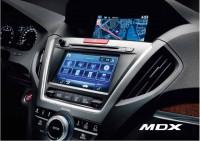
Руководство по эксплуатации навигационной и мультимедийной систем Acura MDX 2006-2009 г.
- Автор: —
- Издательство: Honda Motor Co., Ltd.
- Год издания: 2014
- Страниц: 300
- Формат: PDF
- Размер: 7 Мб
Руководство по ремонту и техническому обслуживанию Acura MDX 2001-2006, Honda Pilot 2003-2008, Honda Ridgeline с 2006 года выпуска. Модели с бензиновым двигателем J35 (3,5 л). Также в руководство входят инструкция по эксплуатации и электросхемы.
- Автор: —
- Издательство: Легион-Автодата
- Год издания: —
- Страниц: 698
- Формат: —
- Размер: —
Руководство по ремонту и техническому обслуживанию Acura MDX. Модели 2006-2013 годов выпуска с двигателем J37A (3,7 л). Также в руководство входят инструкция по эксплуатации, каталог расходных запчастей и цветные электросхемы.
- Автор: —
- Издательство: Легион-Автодата
- Год издания: —
- Страниц: 600
- Формат: —
- Размер: —
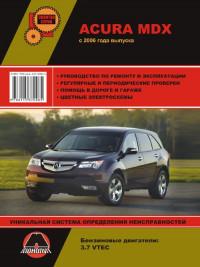
Руководство по ремонту и эксплуатации Acura MDX с 2006 года выпуска с бензиновым двигателем 3,7 VTEC.
- Автор: —
- Издательство: Монолит
- Год издания: —
- Страниц: 462
- Формат: —
- Размер: —

Скидки от справочной
При упоминании АСС вы можете получить скидки на запчасти и услуги
Acura MDX с 2014 г. : Навигация :

ЭКСПЛУАТАЦИЯ
Тип двигателя:
Объем:
Мощность:
Количество страниц: 300
ISBN:
УДК: / ББК:
Автор: Коллектив авторов
ВНИМАНИЕ!